Last updated on January 2nd, 2026 at 01:06 pm
If you are a Redmi user and your phone is suddenly talking to you, reading everything aloud and not responding properly to your touch gestures, well don’t worry, you have activated TalkBack on your device.
The good news is you can turn off TalkBack very easily. In this guide, I will share how to turn off TalkBack in Redmi, just by following some simple steps. The methods discussed below works on all Redmi, POCO and Xiaomi devices, running on MIUI 10, 11, 12, 13, 14 and HyperOS 1.0, 2.0, 3.0.
Also read: How to Turn Off Glance in Redmi: Easy Guide
Table of Contents
What is TalkBack in Redmi?
TalkBack is an accessibility feature that is natively built into Android, it helps visually impaired people to use their phone. It reads out what’s on the screen, provides haptic feedback, and makes it possible to use the phone without looking.
TalkBack changes the general behaviour of how touch screen works, so instead of single tap, you need to do double-tap for clicking on something, for scrolling you need to swipe using two fingers, etc.
On Redmi phones and other Android devices as well, TalkBack can be turned on accidently, and if you don’t need it, turning it off will make your phone fast and normal again.
How to Turn Off TalkBack in Redmi
You can turn off TalkBack using multiple ways, choose the one that works best depending on your situation:
Method 1: Turn Off TalkBack Using the Volume Keys
This is the easiest way to turn off TalkBack on your Redmi phone, especially if you are having difficulties with navigation properly due to TalkBack being turned on.
- Press and hold your Volume Up and Volume Down buttons simultaneously for about 3-5 seconds.
- You’ll get a confirmation saying TalkBack is turned off.
Method 2: Turn Off TalkBack from Settings
If the volume key method didn’t work for you, or if shortcuts are disabled, then you need to disable TalkBack from the settings app of your Redmi device.
- Swipe down from the top of the screen to bring down the notification panel/control center with two fingers (because TalkBack alters single-finger swipe behaviour)
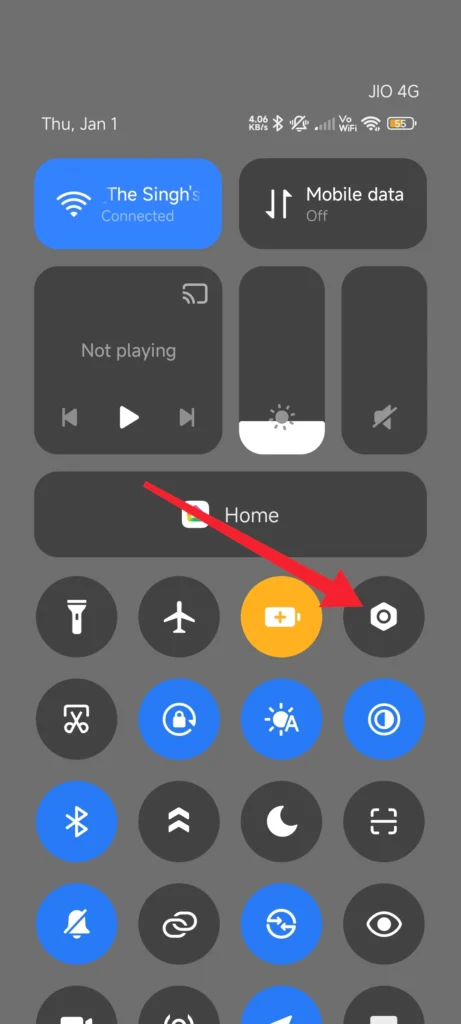
- Double-tap the Settings (gear) icon (single-tap will not work).
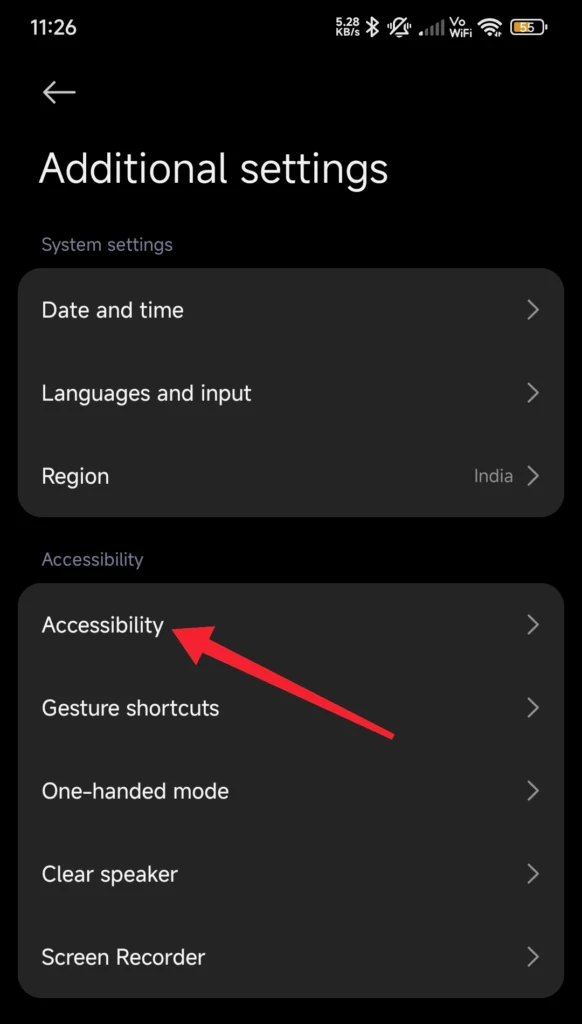
- Use two fingers to scroll to go to Additional Settings
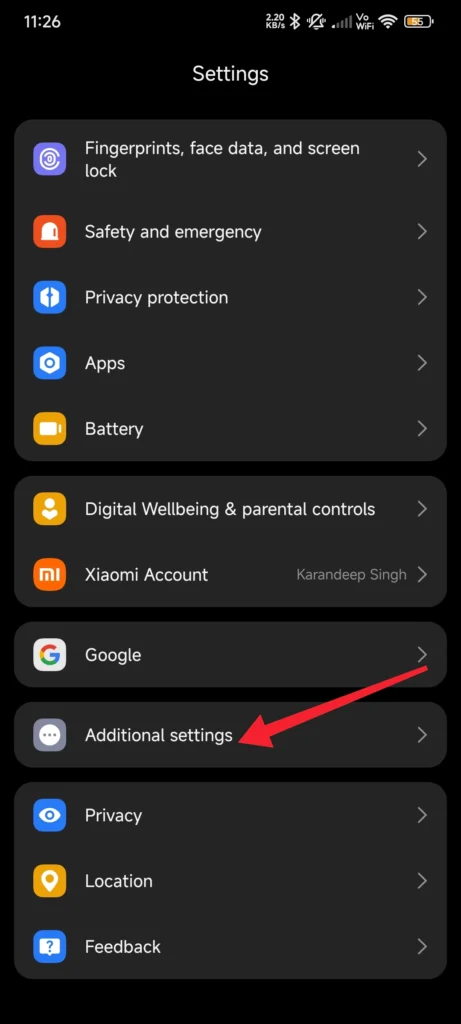
- Double-tap on Accessibility
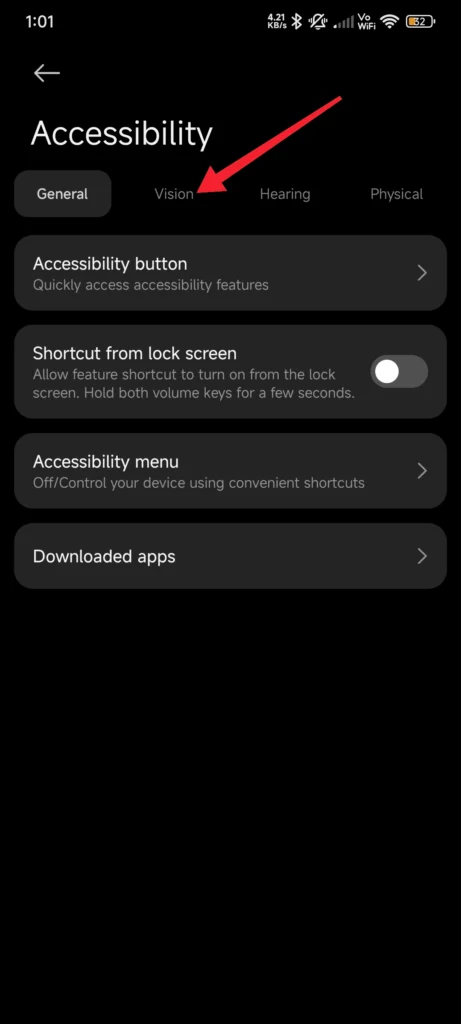
- Double click on Vision
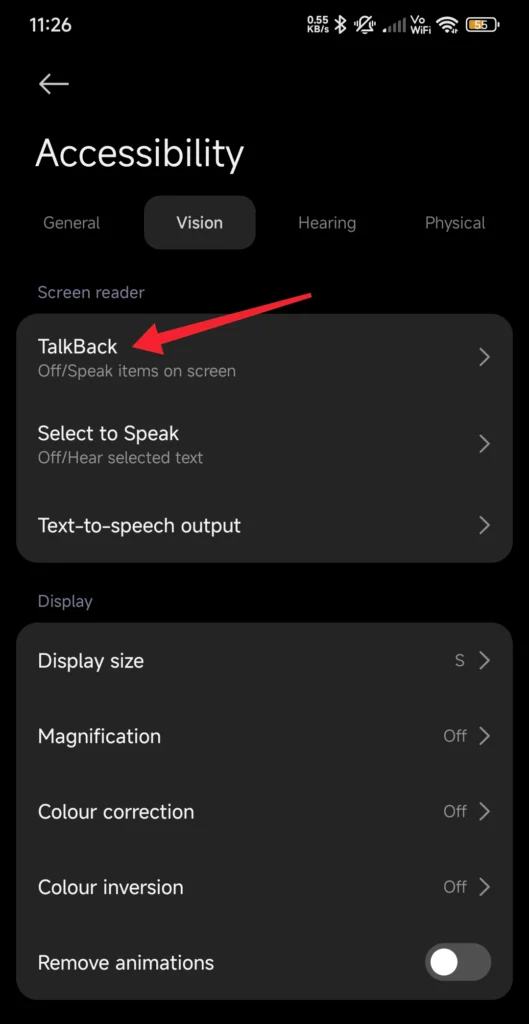
- Double-tap on TalkBack
- Tap the switch to turn TalkBack off. Double-tap to confirm.
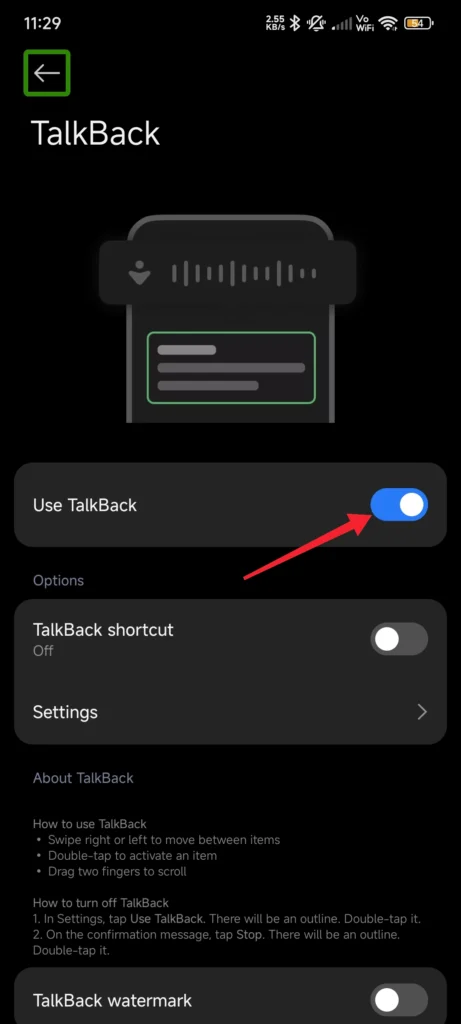
Once you confirm, TalkBack will be disabled instantly, and your phone will return to normal navigation with single-tap and scrolling.
Also read: How to Hide Apps in Redmi: A Step-by-Step Guide
Method 2: Turn Off TalkBack Using Google Assistant
If you have Google Assistant set up and functioning, you can also simply use your voice to turn of TalkBack:
- Just say: “Hey Google, turn off TalkBack.”
Google Assistant will turn off TalkBack on your phone instantly. This method works because TalkBack is part of Android’s Accessibility Suite, and Google Assistant can toggle it for you.
This method can be very helpful if your touch controls are not working properly or if you are unable to navigate your device.
Why Does TalkBack Turn On Automatically?
If TalkBack keeps turning on automatically on your device, especially when you keep the phone in your pocket or while adjusting your volume, it means the TalkBack Shortcut is enabled on your device.
To turn off TalkBack Shortcut:
- Go to Settings
- Scroll down then click on Additional Settings
- Tap on Accessibility
- Click on TalkBack
- Go to TalkBack settings
- Click on Accessibility shortcuts
- Look for the Volume-key shortcut, and turn it off.
Once done, TalkBack will not turn on automatically on your phone, even while pressing volume buttons.
Many users on Reddit have experienced this same issue and have recommended turning off the accessibility shortcut to accidentally trigger TalkBack.
Conclusion
TalkBack is a really helpful accessibility tool for that users that actually need it. But for normal general users, it can be very annoying as it reads out everything on the screen for you.
Thanks to Android and MIUI/HyperOS, we can turn off TalkBack very easily buy following any of the methods discussed above. If this helped, share it with others who are facing the same issue!
If you’d like more guides like this for Redmi & HyperOS updates, be sure to bookmark our site. Additionally, follow us on our social media handles as well.
Also read: How to Remove Safe Mode in Redmi: Quick Guide
FAQs – How to Turn Off TalkBack in Redmi
How do I turn off TalkBack in Redmi without settings?
Press Volume Up + Volume Down buttons for 3 seconds to disable TalkBack instantly.
Why is my Redmi phone talking when I touch the screen?
Because TalkBack mode is turned on in Accessibility settings.
Can I disable TalkBack using voice commands?
Yes, just say “Hey Google, turn off TalkBack.”
How to disable TalkBack in MIUI 14 or HyperOS?
Go to Settings → Additional Settings → Accessibility → TalkBack → Turn Off.
Why do I need to double-tap to open anything?
TalkBack requires double-tapping for accuracy — turning it off restores normal touch actions.
How to scroll when TalkBack is ON?
Use two-finger swipe up/down.